Catalog / prompts worth keeping
Prompt Library Reusable prompts, field-tested. Search the shelf, filter by job, preview the useful bits, and copy the exact prompt when it earns a place in your workflow.
01 Claude Code Status Line Setup Install a Claude Code status line that shows model, context remaining, free tokens, and mood at a glance.
claude-code StatusLine automation developer-tools
Model: Claude Code Use case: Automation Output: Shell script
CopyDescription A machine-setup prompt that replaces any existing Claude Code status line with a precise jq-powered script and settings.json configuration.
Tags claude-code StatusLine automation developer-tools
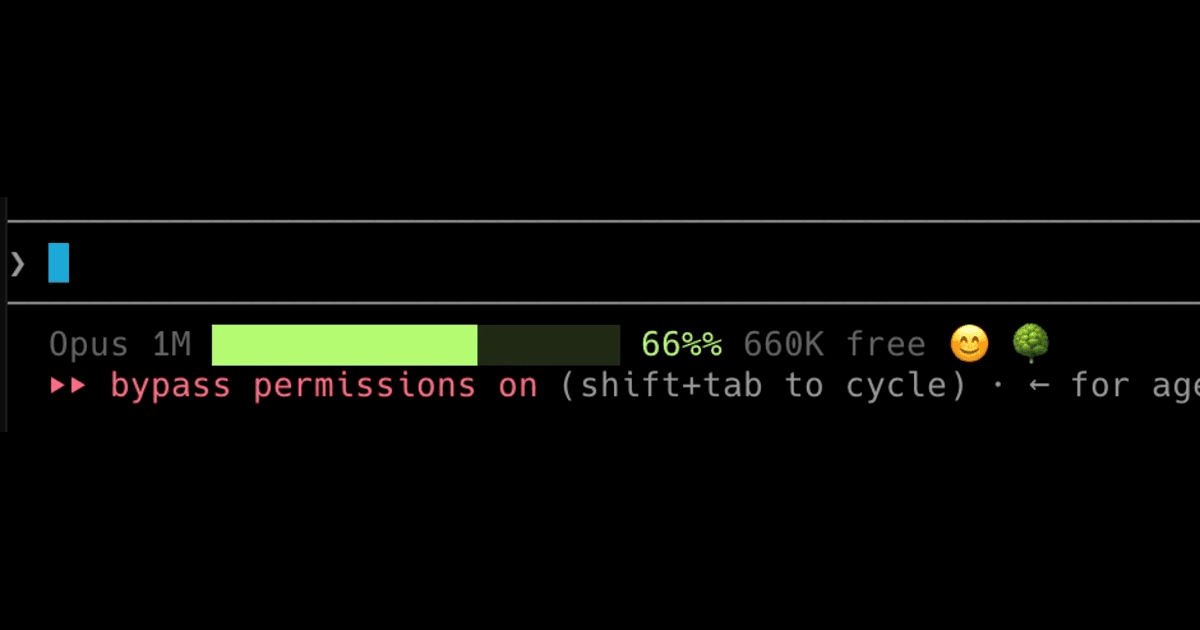
Preview Generic Claude Code status line preview Set up my Claude Code status line to be an exact copy of a specific design.
Use the `/statusline` command to do this — it pulls Claude Code's built-in **statusline-setup** skill that configures the status line setting. But transcribe the script below **verbatim**; do NOT improvise, redesign, or invent your own version.
**IMPORTANT — replace any existing status line:** If I already have a custom status line configured in `~/.claude/settings.json` (or anywhere else), remove/overwrite it so this one fully replaces it. There should be exactly one `statusLine` config when you're done, and it should be this one.
Steps:
1. Make sure `jq` is installed (it's required — without it the bar silently won't render). Check with `command -v jq`. If missing, install it (macOS: `brew install jq`; Debian/Ubuntu: `sudo apt-get install -y jq`).
2. Write this EXACT content to `~/.claude/statusline-command.sh` (create the `~/.claude` dir if needed), then `chmod +x` it:
```bash
#!/usr/bin/env bash
input=$(cat)
# ── Model detection ──────────────────────────────────────────
model_id=$(echo "$input" | jq -r '.model // empty')
if echo "$model_id" | grep -qi "opus"; then
model_label="Opus 1M"
total_tokens=1000000
elif echo "$model_id" | grep -qi "sonnet"; then
model_label="Sonnet 200K"
total_tokens=200000
elif echo "$model_id" | grep -qi "haiku"; then
model_label="Haiku 200K"
total_tokens=200000
else
model_label="Claude"
total_tokens=200000
fi
# ── Context window ───────────────────────────────────────────
remaining=$(echo "$input" | jq -r '.context_window.remaining_percentage // empty')
bar=""
face=""
if [ -n "$remaining" ]; then
pct=$(printf "%.0f" "$remaining")
# Free tokens (human-readable)
free_tokens=$(( total_tokens * pct / 100 ))
if [ "$free_tokens" -ge 1000000 ]; then
free_label="$(( free_tokens / 1000 ))K"
elif [ "$free_tokens" -ge 1000 ]; then
free_label="$(( free_tokens / 1000 ))K"
else
free_label="${free_tokens}"
fi
# Color zone based on remaining %
# Green > 20% — safe
# Amber 10-20% — approaching compaction
# Red < 10% — compaction imminent
if [ "$pct" -gt 20 ]; then
color="\033[32m" # green
elif [ "$pct" -ge 10 ]; then
color="\033[33m" # yellow / amber
else
color="\033[31m" # red
fi
reset="\033[0m"
dim="\033[90m"
# 20-char wide bar
width=20
filled=$(( pct * width / 100 ))
[ "$filled" -gt "$width" ] && filled=$width
empty_count=$(( width - filled ))
filled_str=""
empty_str=""
for ((i=0; i<filled; i++)); do filled_str+="█"; done
for ((i=0; i<empty_count; i++)); do empty_str+="░"; done
bar="${color}${filled_str}${reset}${dim}${empty_str}${reset} ${pct}% ${free_label} free"
# ── Smiley face (mood based on remaining context) ──────────
if [ "$pct" -ge 75 ]; then
face="😄"
elif [ "$pct" -ge 55 ]; then
face="😊"
elif [ "$pct" -ge 40 ]; then
face="😐"
elif [ "$pct" -ge 30 ]; then
face="😟"
elif [ "$pct" -ge 20 ]; then
face="😰"
elif [ "$pct" -ge 10 ]; then
face="😱"
elif [ "$pct" -ge 3 ]; then
face="🤮"
else
face="💀"
fi
fi
# ── Assemble output ──────────────────────────────────────────
output="${model_label}"
[ -n "$bar" ] && output="${output} ${bar}"
[ -n "$face" ] && output="${output} ${face}"
printf "%b" "$output"
```
3. Wire it into `~/.claude/settings.json`. PRESERVE all my other existing settings — only add or replace the top-level `statusLine` key (replacing any status line I already had). Use my real absolute home path (run `echo $HOME` to get it; do not hardcode someone else's username):
```json
"statusLine": {
"type": "command",
"command": "bash <MY_HOME>/.claude/statusline-command.sh"
}
```
If `settings.json` doesn't exist, create it as valid JSON containing just that key. If it exists, merge carefully so the rest of the file is untouched and any previous `statusLine` is overwritten.
4. Confirm it works: pipe a sample payload through the script and show me the output, e.g.:
```bash
echo '{"model":"claude-opus-4","context_window":{"remaining_percentage":82}}' | bash ~/.claude/statusline-command.sh
```
It should print something like: `Opus 1M ████████████████░░░░ 82% 820K free 😄`
The expected status line format is: `<model label> <colored 20-char bar> <pct>% <free tokens> free <mood emoji>`.
Variables MY_HOMEAbsolute home path used in the settings.json command.
remaining_percentageSample context-window percentage used for verification.